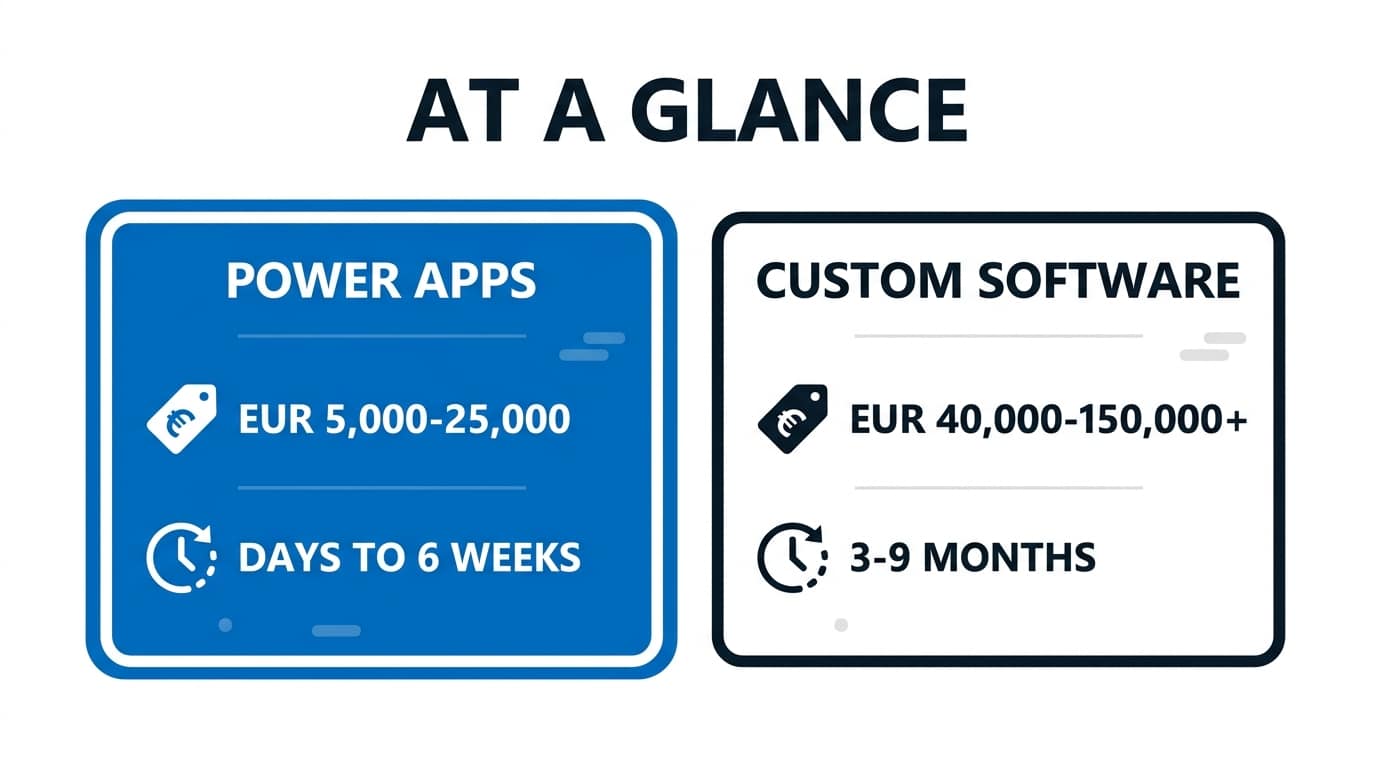
For internal business apps, Power Apps is typically three to five times faster to build than custom software and costs a fraction upfront: roughly €5,000-€25,000 for a partner-built app versus €40,000-€150,000+ for a comparable custom build (approximate 2026 ranges). Custom development wins back ground on licensing at scale, customer-facing products, and demanding UX. The honest answer to “Power Apps vs custom software” depends on who uses the app, how many of them there are, and for how long.
This comparison walks through build cost, speed, licensing maths, maintenance, and the specific cases where custom development is still the right call for an SME. Power Apps sits inside the broader Microsoft Power Platform family of low-code tools, and this guide zooms in on just the app-building piece.
What Does Each Approach Cost to Build?
A focused Power Apps solution, say a warehouse inspection app or an expense approval tool, takes a maker or partner days to a few weeks. Screens, forms, and logic are assembled visually; authentication comes free via Microsoft Entra ID; and 1,000+ prebuilt connectors handle integration with SharePoint, SQL, Business Central, and Outlook. Typical partner-built projects land between €5,000 and €25,000 depending on complexity, and simple apps built in-house cost mainly staff time.
Custom software carries fixed overheads regardless of app size: requirements and UX design, front-end and back-end development, authentication and security hardening, testing, and deployment pipelines. Even a modest bespoke web app from a Spanish agency rarely comes in under €30,000-€40,000, and mobile plus web doubles the surface area. None of that is wasted money, it buys total control, but you pay it before seeing any value.
If you want a feel for what building on the platform involves, our step-by-step guide to building custom applications with Power Apps walks through a real app from blank canvas to publishing.
How Much Faster Is Power Apps, Really?
In our experience, three to five times faster is a fair rule for typical internal apps, and the gap widens for form-and-workflow tools. A holiday request app is an afternoon in Power Apps and several sprints as custom code once you include authentication, hosting, and an approvals engine. Copilot in Power Apps now generates first-draft screens and Dataverse tables from a description, which shortens the start even further.
The speed advantage shrinks when requirements get unusual. Pixel-perfect branded UI, offline-heavy field work, or complex custom logic push you into Power Apps workarounds that erode the head start. A rough guide: if more than about a quarter of the requirements fight the platform, the speed argument weakens, and it’s time to price the alternatives seriously.

Power Apps vs Custom Software: Side by Side
| Factor | Power Apps | Custom software |
|---|---|---|
| Build time (typical internal app) | Days to 6 weeks | 3-9 months |
| Upfront cost (approx., 2026) | €5,000-€25,000 with a partner | €40,000-€150,000+ |
| Ongoing licensing | ~€19/user/month (Premium) or pay-as-you-go | None, but hosting ~€100-€500/month |
| Maintenance | Platform updated by Microsoft; you maintain the app logic | You own the full stack: patches, frameworks, servers |
| UX flexibility | Good for forms and workflows; limited for bespoke design | Unlimited |
| External / customer users | Awkward and costly to license at scale | Natural fit |
| Integration with Microsoft 365 | Native, 1,000+ connectors | Custom API work required |
| Skills needed to maintain | Power user or citizen developer | Professional developers |
The Licensing Maths Nobody Runs Upfront
Here’s where comparisons get interesting. As of 2026, Power Apps Premium lists at roughly €19 per user per month, and pay-as-you-go costs around €9-10 per active user per app per month; current figures are on the official Power Apps pricing page. Crucially, apps that only use standard connectors like SharePoint, Outlook, and Teams are already covered by most Microsoft 365 business licences, so plenty of SME apps run at zero extra licence cost.
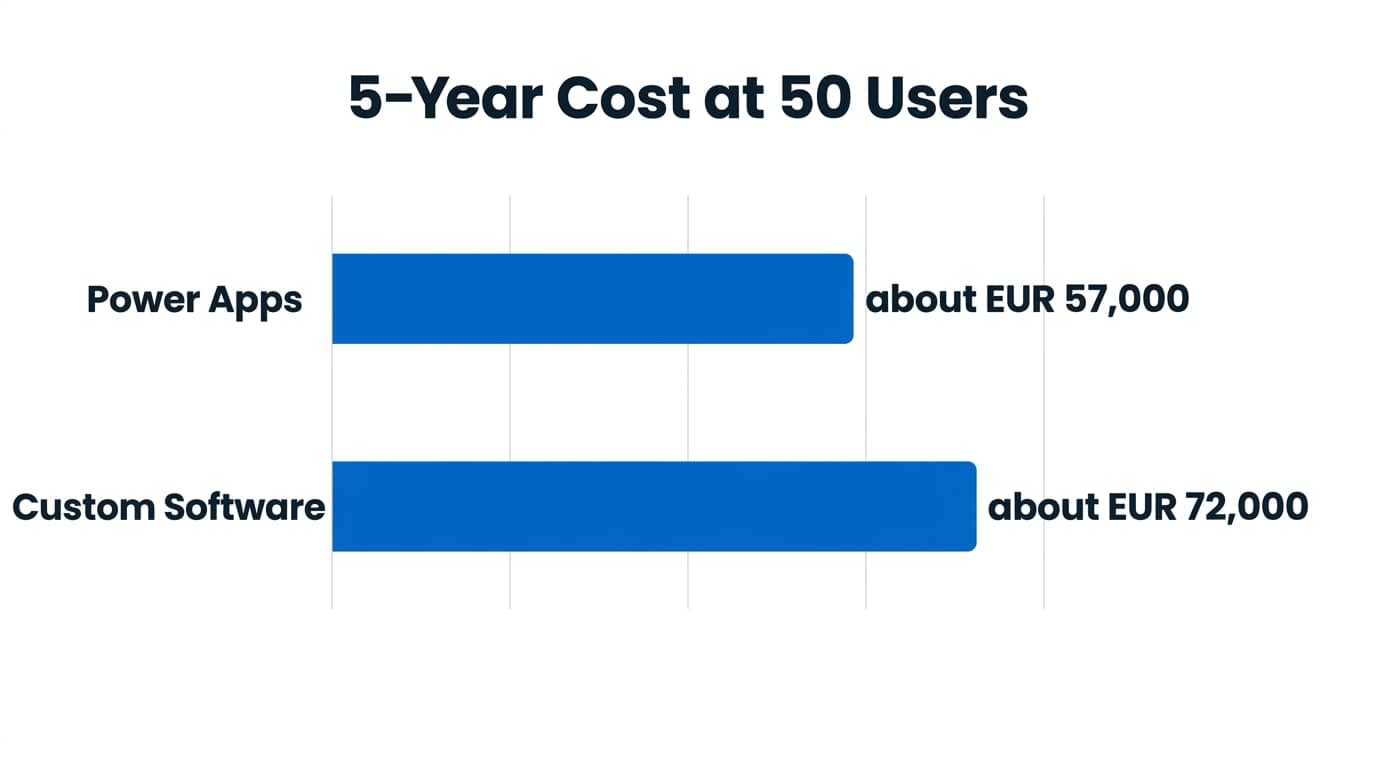
Now run a five-year total. Fifty users on Premium at ~€19 is about €11,400 a year, ~€57,000 over five years, on top of the build. A €60,000 custom software build with €200 monthly hosting reaches roughly €72,000 in the same period, before any developer time for changes. At 50 users the two paths are closer than most people expect; at 500 users, Premium licensing alone would top €500,000, and custom development starts winning on arithmetic.
The practical takeaway for a typical 20-100 person SME: if your users already have Microsoft 365 and the app can live on standard connectors or a single Dataverse app under pay-as-you-go, Power Apps is very hard to beat on total cost.
Who Carries the Maintenance Burden?
With Power Apps, Microsoft maintains the platform: security patches, browser compatibility, infrastructure, and mobile clients arrive without your involvement. Your responsibility is the app logic itself, plus light governance, meaning environments, solution management, and deciding who can build what. That’s real work, but it’s measured in hours per month, and it survives staff turnover because the skills are widespread.
Custom software makes you the platform owner. Framework upgrades, dependency vulnerabilities, server patching, SSL renewals, and GDPR-compliant hosting are all yours, forever. The riskiest cost is the human one: many Spanish SMEs have a bespoke tool that nobody dares touch because the developer who built it left in 2021. Budget 15-25% of the original build cost per year for honest custom maintenance; software that gets no maintenance budget is quietly accumulating debt.
When Does Custom Development Win?
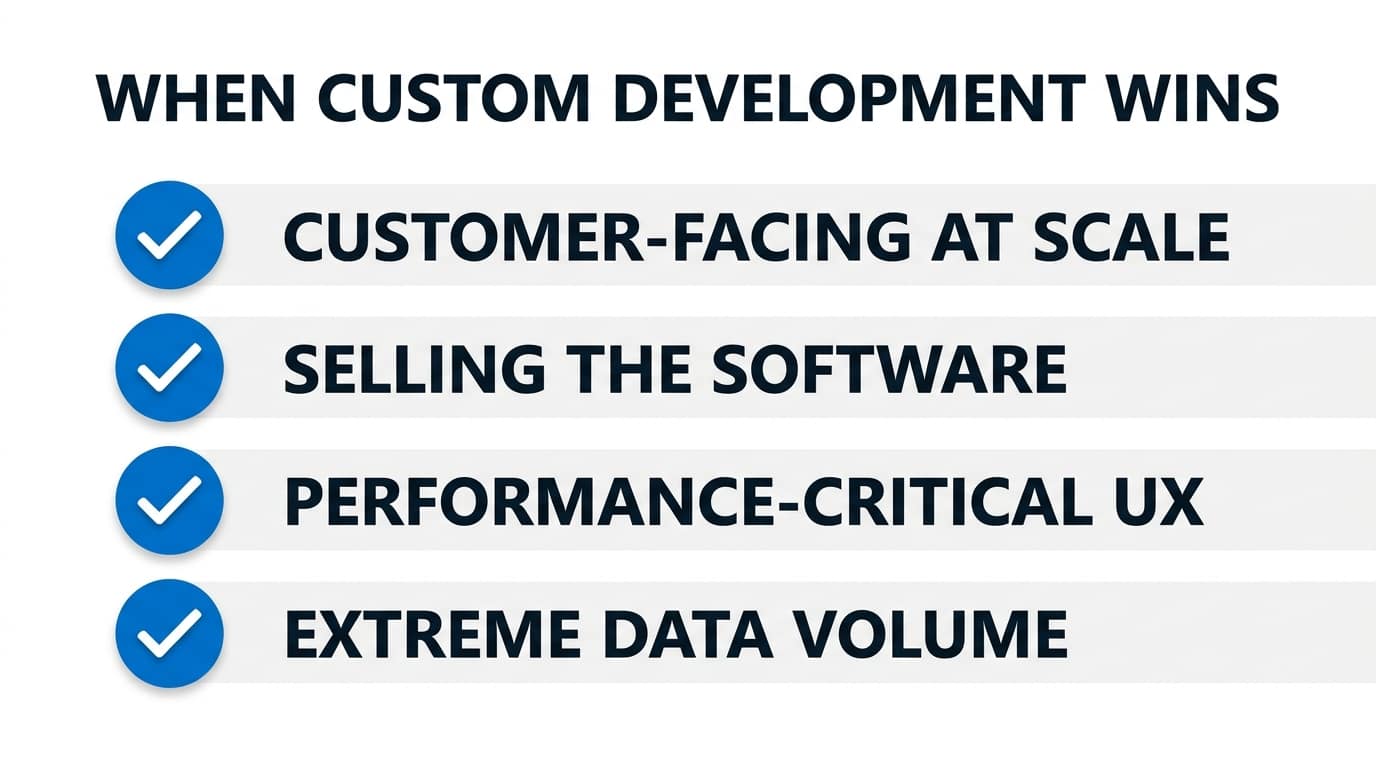
Power Apps isn’t the right answer everywhere. Custom development is usually the better path when:
- The app faces customers at scale. Thousands of external users make Power Apps licensing and UX constraints painful; a custom web app or portal fits better.
- You’re selling the software. A product needs your own stack, branding, and margins, not a per-user platform fee baked into your cost of goods.
- Performance or UX is the product. Real-time processing, heavy offline use, complex visualisations, or a design-led mobile experience exceed what canvas apps do gracefully.
- Data volumes or logic are extreme. Millions of rows with complex server-side logic push past Dataverse delegation limits and belong in a purpose-built backend.
A useful test: describe the app in one sentence. “Staff fill in, approve, and track X” is Power Apps territory. “Our customers experience X” or “we sell X” points to custom software.
The Hybrid Approach Most SMEs Overlook
This isn’t an either-or decision. A common pattern we recommend: build the staff-facing screens in Power Apps, put genuinely complex logic in an Azure Function exposed through a custom connector, and let Power Automate handle notifications and approvals around the edges. You get custom-grade logic where it matters and platform speed everywhere else. Our post on Power Automate best practices covers the workflow half of that pattern.
Sequencing is the other hybrid. Start in Power Apps, validate the process with real users for six months, and only then decide whether anything needs rebuilding as custom software. Most apps never do, and the few that outgrow the platform get rebuilt against proven requirements instead of guesses. Teams already streamlining processes with the Power Platform tend to discover that the second and third apps cost far less than the first.
Frequently Asked Questions
Can Power Apps be used for customer-facing apps?
Technically yes, via Power Pages for external websites and portals, which has its own capacity-based pricing. It works well for supplier portals, self-service forms, and customer request tracking. For a polished consumer product with thousands of anonymous users, though, licensing economics and design constraints usually favour a custom software build instead.
Do we need Dataverse, or can we use SharePoint lists?
SharePoint lists are fine for small apps: they’re covered by Microsoft 365 licences and handle simple forms happily. Choose Dataverse when you need relational data, row-level security, larger volumes, or integration with Dynamics 365. Dataverse triggers premium licensing, so the choice is as much financial as technical. Many SMEs start on SharePoint and graduate later.
What skills do we need in-house to maintain a Power App?
One capable power user, someone comfortable with Excel formulas and logical thinking, can maintain most canvas apps after some training. Power Fx, the formula language, is deliberately Excel-like. Reserve partner or developer help for integrations, custom connectors, and governance setup. That’s a far lower bar than retaining or contracting professional developers to keep custom software alive.
How long does a typical Power Apps project take with a partner?
For a single-process app, expect one to three weeks from workshop to a working version, then a week or two of feedback rounds before rollout. Larger apps with Dataverse, several roles, and integrations run six to ten weeks. Either way you’re testing something real within days, which is the fundamental speed difference from custom builds.
Getting Started
List your candidate apps, mark who uses each one and how many users it has, and run the five-year licensing maths from this article on the top two. That exercise usually settles the Power Apps vs custom software debate in under an hour. If you’d like help with the decision or the build itself, AlishBit designs and delivers Power Platform solutions for SMEs in Spain and across Europe, including the hybrid architectures covered above.
Ready to Automate Your Processes?
AlishBit builds Power Platform solutions for businesses across Spain and Europe. Book a free consultation and find out what a first project would look like.