Dynamics 365 Field Service is Microsoft’s application for companies that send technicians to customer sites. It runs the whole job lifecycle in one system: work orders, scheduling and dispatch, mobile execution, parts and stock, service contracts, and the handover to invoicing. If your business installs, repairs, or maintains equipment at customer locations, this guide walks through what the product actually does, piece by piece, with approximate 2026 licensing costs at the end.
It runs on the same Microsoft Dataverse platform as the rest of Dynamics 365, so customers, cases, and work orders live in one database rather than three disconnected tools. The official documentation on Microsoft Learn covers every setting; here we’ll focus on what matters when you’re deciding whether it fits your business.

Who Is Dynamics 365 Field Service For?
The product is built for organisations with a mobile workforce and repeatable on-site jobs. Four profiles get the most value:
- HVAC and climate businesses. Think of an installer in Málaga maintaining air conditioning for hotels along the Costa del Sol, with a predictable surge of breakdown calls every June.
- Equipment maintenance providers. Companies servicing lifts, industrial machinery, medical devices, or coffee equipment under contract, where missed visits mean penalties.
- Installation businesses. Solar panels, telecoms, security systems, EV chargers: anywhere a survey, an install, and a follow-up visit repeat in a pattern.
- Facilities management. Multi-site cleaning, electrical, and repair teams juggling reactive tickets against planned rounds.
The sweet spot starts at roughly five to ten technicians. Below that, a shared calendar might still cope. Once dispatchers spend their mornings phoning around to find who’s free, or contractual visits get missed because agreements live in a spreadsheet, the platform starts paying for itself.
How Does the Work Order Lifecycle Work?
Everything in Field Service revolves around the work order: a record carrying the what, where, who, and how much of a job. A typical lifecycle looks like this:
- Create the work order. It can come from a customer service case, a phone call, a recurring agreement, a customer portal, or an IoT alert.
- Apply an incident type. Incident types are reusable job templates (“annual boiler service”) that auto-fill tasks, required skills, estimated duration, and typical parts.
- Schedule it. A dispatcher drags it onto the schedule board, or lets the Schedule Assistant suggest the best technician.
- Dispatch. The technician sees the booking in the mobile app with directions and full job details.
- Do the work. Booking statuses move from Traveling to In Progress to Completed while the technician logs parts used, photos, and a customer signature.
- Review and post. A supervisor checks the completed work order, then posts it, which locks the record and generates the billing detail.
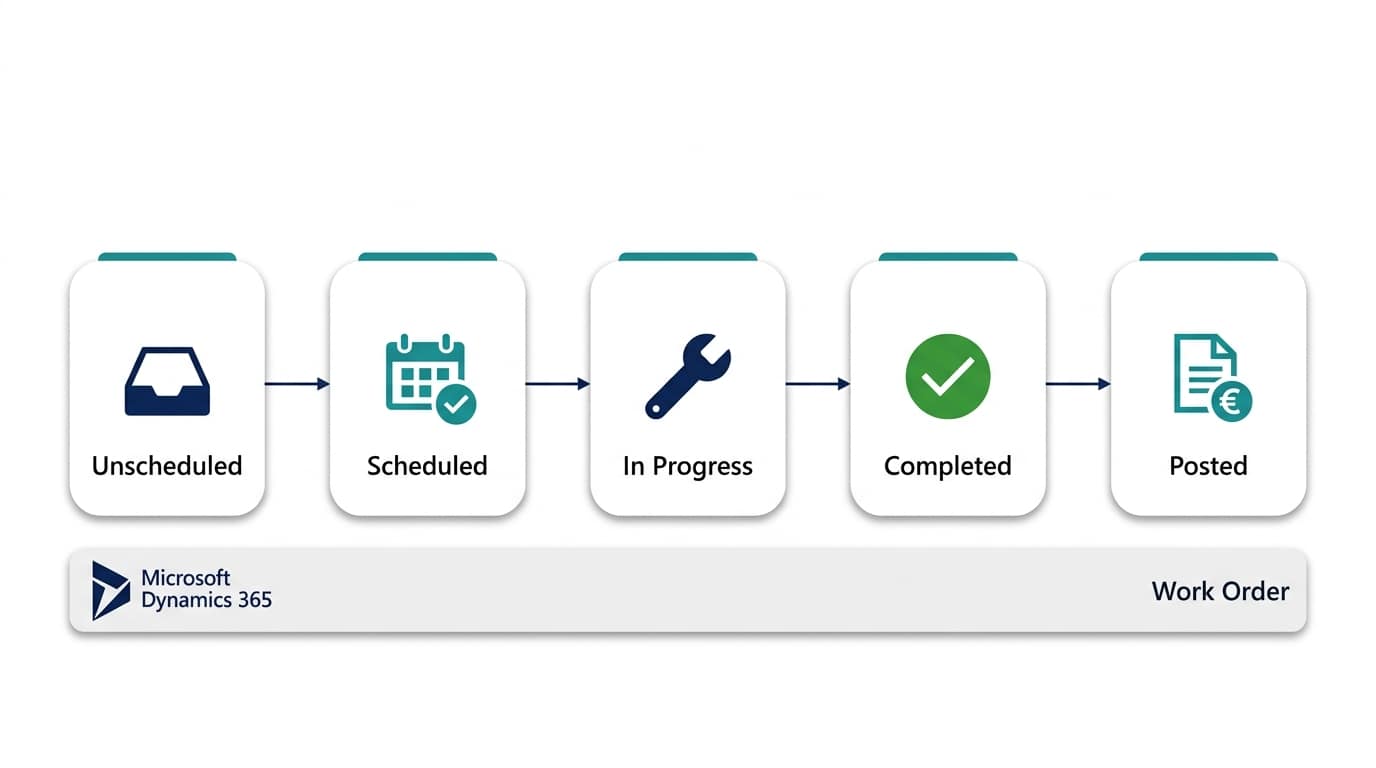
System statuses run Unscheduled, Scheduled, In Progress, Completed, and Posted, and you can extend them with your own substatuses. Running a workshop to define your incident types is the single highest-value setup task, and it’s where tailoring Dynamics 365 to your own processes makes the biggest difference.
What Can Dispatchers Do on the Schedule Board?
The schedule board is a drag-and-drop view of every technician’s day, week, or month, with unscheduled work orders queued underneath. Dispatchers filter by territory or skill, and a map tab shows technician locations and routes. Colour-coded booking statuses reveal at a glance who’s travelling, who’s on site, and who’s free.
Matching is where it gets clever. The Schedule Assistant ranks available technicians by required skills, territory, working hours, and estimated travel time, so the dispatcher picks from a shortlist instead of guessing. For most SMEs that assistant alone kills the daily phone-around. Larger teams can automate the whole board with an add-on, which we cover under licensing below.

What Do Technicians Get in the Mobile App?
Technicians use the Field Service mobile app on iOS or Android. It shows the day’s bookings, job details, the service history of the asset, and directions. On site, they complete task checklists and inspection forms, scan barcodes on parts, capture photos, record products and services used, and collect the customer’s signature before closing the booking.
Offline mode matters more than demos suggest. The app keeps an offline copy of the technician’s data and syncs when coverage returns, which is essential in basements, plant rooms, and rural areas. As of 2026, Copilot in the app can also summarise a work order’s history, so a technician arrives briefed without reading ten records in a car park.
How Are Parts and Inventory Handled?
Field Service tracks stock across warehouses, and each van can be its own warehouse. Truck stock decreases as technicians consume parts on work orders, inventory transfers move items between the main store and vehicles, and purchase orders can be raised against a specific work order when a part isn’t on hand. Returns flow through RMA and RTV records.
On the accounting side, Microsoft ships a standard integration between Field Service and Business Central, so posted work orders can flow into invoicing and stock in your ERP instead of being retyped. If that side of the platform is on your radar, see our guide to managing finances with Business Central.

Agreements and Preventive Maintenance
Agreements are the contract engine. You define a recurrence, say a quarterly service visit for each of a client’s 40 air-conditioning units, and Field Service generates the work orders automatically ahead of time, pre-filled with the right incident type, location, and price list. Invoice setups on the same agreement can generate recurring invoices on their own schedule.
This is where service businesses usually see the fastest payback: no more missed contractual visits, and renewal conversations backed by real service history instead of memory. Many teams pair agreements with Power Automate flows for customer reminders, approval steps, and notifications when a visit is booked or completed.
Where Do IoT Alerts Fit In?
Connected Field Service links sensors to service. A vibration or temperature reading from a machine raises an IoT alert inside Dynamics 365, and a rule or a person can convert that alert straight into a work order. That moves you from reacting to breakdowns towards fixing things before they fail.
Be realistic here, though. It requires Azure IoT plumbing and instrumented equipment. Most SMEs in Spain go live without IoT and add it later for their highest-value assets. It’s a genuine differentiator for manufacturers who service their own installed base, and safely ignorable on day one for everyone else.

How Much Does Dynamics 365 Field Service Cost?
Licensing is per user, per month. The figures below are approximate list prices as of 2026; confirm on the official Dynamics 365 pricing page, because currency, region, and partner agreements all shift the final number.
| Licence | Approx. price (2026) | Who needs it |
|---|---|---|
| Field Service | ~$105 (about €100) per user/month | Technicians, dispatchers, and managers using the full app |
| Field Service Contractor | ~$50 per user/month | Third-party subcontractors you schedule |
| Attach licence | ~$20 per user/month | Users who already hold a qualifying full Dynamics 365 licence |
| Team Members | ~$8 per user/month | Light users viewing records or logging basic activity |
Resource Scheduling Optimization, the add-on that automatically builds and rebuilds entire schedules, is licensed separately. Budget beyond licences too: for a typical SME rollout, implementation effort usually costs more than the first year of subscriptions, so scope tightly and phase the project.
Frequently Asked Questions
Does Dynamics 365 Field Service integrate with Business Central?
Yes. Microsoft provides a standard, supported integration that syncs customers, items, and posted work orders into Business Central for invoicing and stock. It arrived in recent release waves and keeps improving, so check current documentation for exact field coverage. For anything unusual, Power Automate or a partner-built integration fills the gaps.
Can technicians use the mobile app offline?
Yes. An offline profile defines which records the app stores on the device, and technicians can view bookings, complete checklists, capture photos, and record parts without coverage. Changes sync automatically when the connection returns. Plan the offline profile carefully, because syncing everything makes the app slow.
How long does an implementation take?
For an SME with reasonably standard processes, a focused core rollout of work orders, the schedule board, and the mobile app typically takes 8 to 12 weeks. Agreements, inventory, customer portals, and IoT are best added in later phases once the team actually uses the basics daily.
Is Field Service overkill for a ten-person company?
Not necessarily. If those ten people work under service contracts with SLAs, the agreements and preventive maintenance features alone can justify it. If you run occasional ad-hoc jobs with no contracts, a simpler setup built on Power Apps might serve you better and cost less.
Getting Started
Start small: one territory, one team, your five most common incident types, and the mobile app. Prove the schedule board in daily use before layering on agreements, inventory, and IoT. Measure travel time and first-time fix rate from week one, so you can show the difference later.
AlishBit is a Dynamics 365 consultancy based in Málaga that helps service and maintenance businesses across Spain scope, implement, and support Field Service. If you’d like a realistic assessment of fit, phasing, and cost for your team, we’re happy to talk it through. If you’re based nearer Málaga specifically, our page on Dynamics 365 Field Service delivery in Andalucía covers what local support and phasing typically looks like.
Running a Field Service Team?
AlishBit implements Dynamics 365 Field Service for service businesses across Spain and Europe. Book a free consultation and see the schedule board on your own jobs.