A realistic Business Central implementation timeline for an SME is 12 to 20 weeks from kickoff to go-live. Finance-only projects can land in 6 to 10 weeks, while implementations covering inventory, warehousing, or manufacturing typically need 16 to 24. Anyone quoting two weeks is describing a software install, not an implementation.
Below is the phase-by-phase implementation timeline we use with Spanish and European SMEs: what happens in each phase, how long it genuinely takes, why projects slip, and where rapid-start options can honestly save time. If you’re still weighing up the move to an ERP at all, start with the business case in our post on the benefits of Microsoft ERP for growing businesses, then come back to the schedule.

How Long Does a Business Central Implementation Take?
Scope drives the implementation timeline more than company size does. A 15-person consultancy replacing spreadsheets with finance and projects moves faster than a 40-person distributor with three warehouses, EDI, and an online shop. As rough planning bands for 2026:
- Finance and purchasing only: 6-10 weeks
- Finance plus sales, inventory, and basic warehousing: 12-16 weeks
- Manufacturing, advanced warehousing, or multiple companies: 16-24+ weeks
Add contingency if your project crosses August: much of Spain effectively pauses for several weeks, and a go-live scheduled for late July with training in mid-August is a plan built to fail.
The Phase-by-Phase Implementation Timeline
Here’s the full sequence for a typical mid-scope SME project. Phases overlap in practice; data migration in particular runs alongside build and testing rather than after them.
| Phase | Typical duration | What actually happens |
|---|---|---|
| Discovery & scoping | 1-2 weeks | Process walkthroughs, fit-gap analysis, scope and budget agreed |
| Solution design | 2-3 weeks | Chart of accounts, dimensions, posting groups, integrations mapped |
| Build & configure | 3-6 weeks | Environment setup, configuration, extensions, report layouts |
| Data migration | 2-4 weeks (overlapping) | Extract, clean, and load masters; trial loads; opening balances plan |
| User acceptance testing | 2-3 weeks | Key users run end-to-end scenarios with migrated data; fixes |
| Training | 1-2 weeks (overlapping) | Role-based sessions, cheat sheets, process documentation |
| Go-live & cutover | 1 week | Final data load, opening balances, first live transactions |
| Hypercare | 2-4 weeks | Daily support, month-end close assistance, snag fixing |
Discovery and design: where the project is really won
Discovery is short but decisive. The partner walks your order-to-cash and purchase-to-pay processes, flags where standard Business Central fits, and lists genuine gaps. Design then fixes the foundations: chart of accounts, dimensions, posting groups, and Spanish localisation requirements such as SII reporting and VeriFactu-compliant invoicing. Decisions skipped here resurface in UAT at triple the cost.
Build and data migration: parallel tracks
While consultants configure the system, your team owns the least glamorous work on the project: cleaning customer, vendor, and item data. Expect at least two trial migration loads before the real one. A useful rule of thumb: migrate open transactions and opening balances, keep history in the old system or a reporting database, and resist the urge to import ten years of everything.
UAT, training, and go-live
UAT means key users processing real scenarios end-to-end: quote to invoice, purchase to payment, a month-end close, and your ugliest edge cases, like partial deliveries or credit notes with item charges. Training works best role-based and hands-on, days before go-live rather than weeks. Cutover itself is usually a weekend: final data load Friday, checks Saturday, first live orders Monday.
Hypercare: the phase people forget to budget
Plan two to four weeks of intensive support after go-live, always covering the first month-end close. That first close is where posting group mistakes, VAT setup issues, and missed training show up. Budget for it explicitly; “go-live” isn’t the finish line, the first clean close is.

What Makes a Business Central Implementation Timeline Slip?
Across the projects we’ve seen, five causes account for nearly every slipped week:
- Dirty master data. Duplicated customers, items with no units of measure, prices living in someone’s spreadsheet. Data cleaning always takes longer than anyone budgets.
- Slow decisions. If nobody can approve the chart of accounts or a process change within a few days, every open question stalls the build behind it.
- Scope creep via customisation. Each “small tweak to match how we’ve always done it” adds development, testing, and future upgrade friction. Adopt standard processes where you can.
- Key users with full day jobs. UAT done in stolen hours produces shallow testing and painful go-lives. Plan 20-50% of key users’ time during build and UAT weeks.
- Compliance left for last. Spanish requirements like SII and VeriFactu belong in design, not in week 14. Our post on automating compliance and reporting for Spanish businesses shows why building these flows early pays off.
Notice that four of the five sit on the customer side. The partner matters enormously, but implementation timeline discipline is mostly about your own team’s availability and decisiveness.
Can You Go Live Faster? Rapid-Start Options
Yes, within limits. Business Central ships with RapidStart configuration packages, which load setup and master data from Excel templates, plus assisted setup guides for banking, VAT, and approvals. Partners layer their own accelerators on top: preconfigured Spanish charts of accounts, VAT posting setups, and standard report packs.
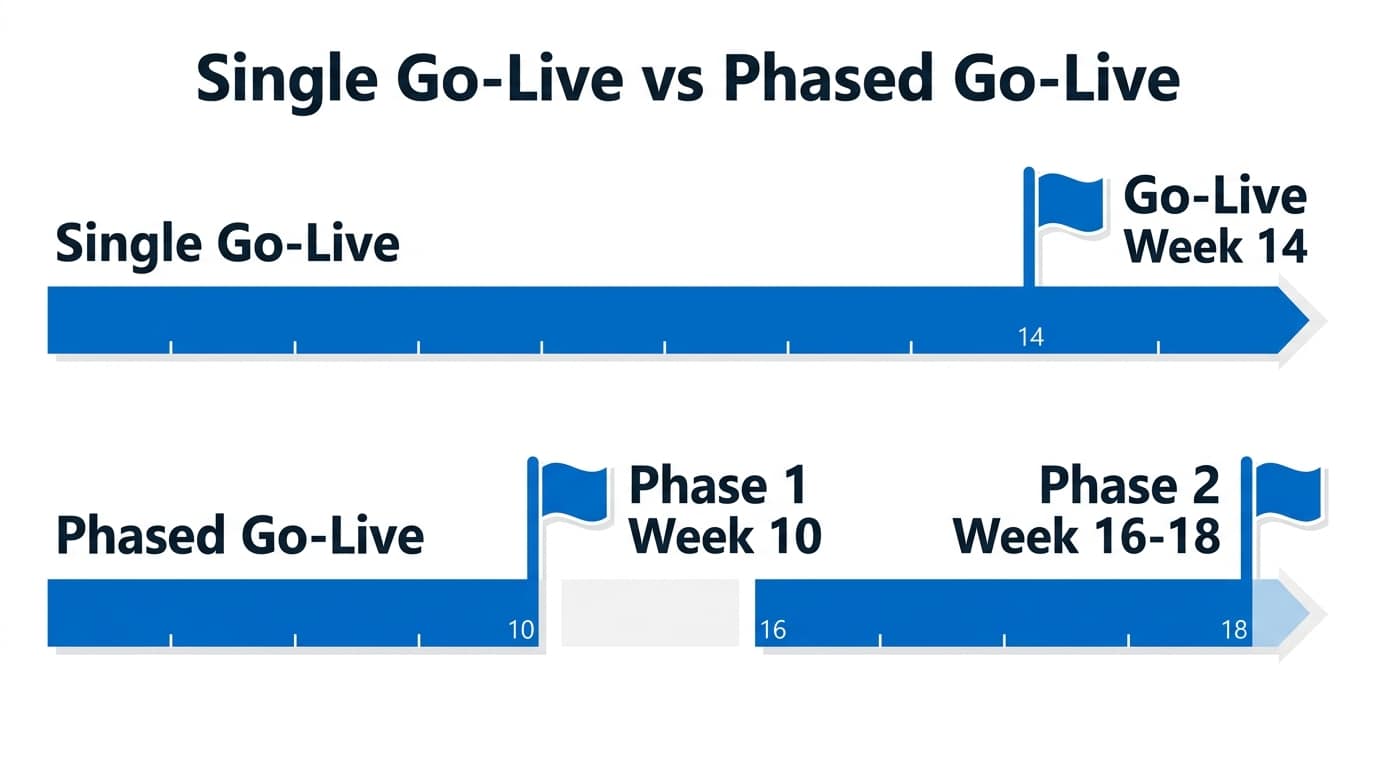
The other legitimate accelerator is phasing. Go live with finance, purchasing, and sales first, then switch on warehousing or manufacturing in a second phase six to eight weeks later. You bank value early and reduce go-live risk, in exchange for running some processes the old way a little longer.
What rapid-start doesn’t compress is your side of the work: data cleaning, testing, and learning new processes. A disciplined 8-week project is achievable for simple scopes; a 3-week one isn’t, whatever the brochure says.
A Worked Example: 35-Person Distributor in Málaga
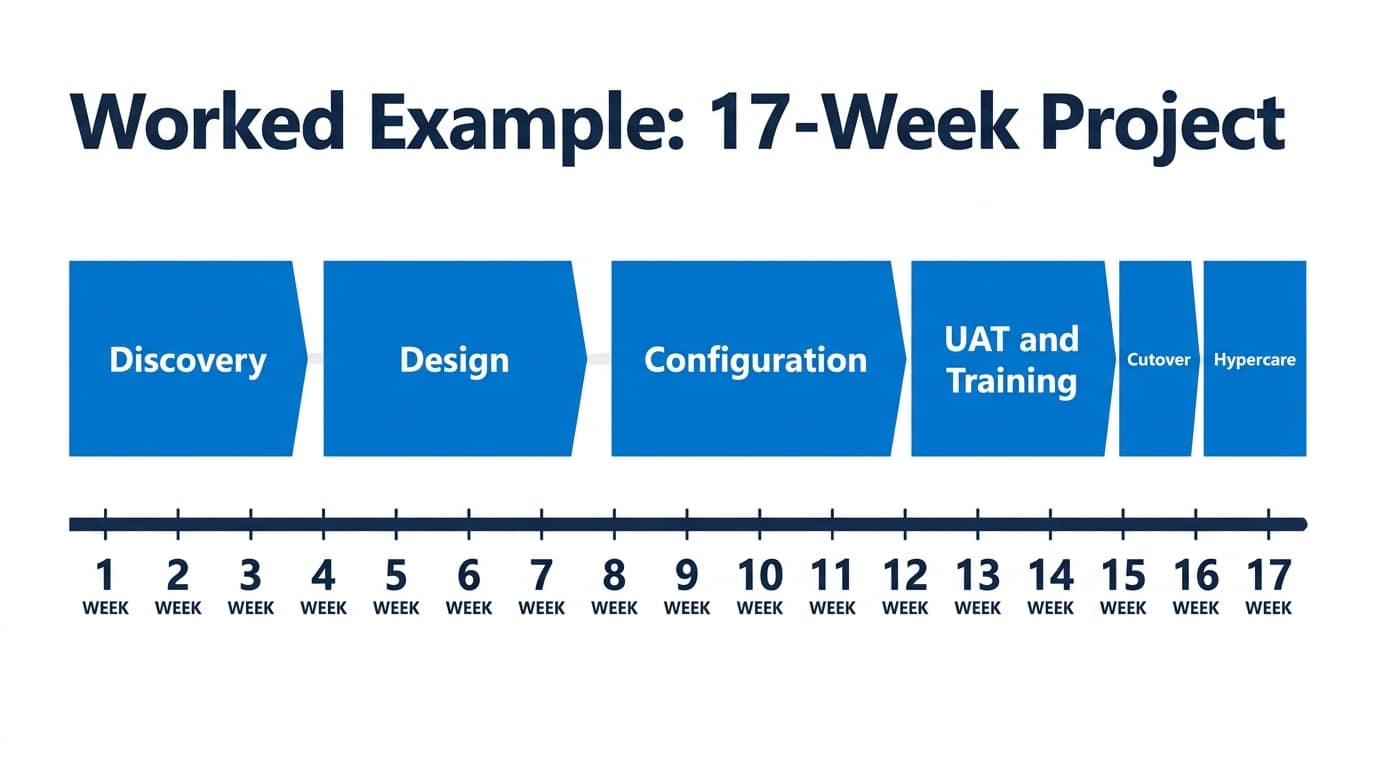
Imagine a 35-person building materials distributor with two warehouses moving off an ageing local ERP. Weeks 1-2: discovery and fit-gap. Weeks 3-5: design, including dimensions, SII setup, and an EDI decision. Weeks 6-10: configuration and two trial data loads. Weeks 10-12: UAT and role-based training. Week 13: cutover over a weekend. Weeks 14-17: hypercare through the first month-end close. Total: about four months, with the finance lead and warehouse manager each committing roughly two days a week from week 6 onward.
The single biggest factor in hitting that implementation timeline is the team on both sides. Our guide on what to look for in a Dynamics 365 partner in Spain covers the questions worth asking before you sign, including who exactly will staff your project.
Frequently Asked Questions
Do we have to go live on 1 January?
No. Business Central handles mid-year go-lives cleanly: you load opening balances as of any month-end and post from there. A quieter month often beats January, when finance teams are busy with year-end close and holiday backlogs. Pick the month-end with the lowest operational load, and avoid cutting over just before August or the Christmas peak.
How much of our team’s time will the project need?
Plan for a project owner spending several hours weekly throughout, and key users (finance lead, warehouse or ops lead) giving 20-50% of their time during design, testing, and training weeks. Backfill their routine work where possible. Projects staffed with “whoever has spare time” reliably overrun their implementation timeline and go live undertested.
What does hypercare actually include?
Hypercare is intensive post-go-live support: daily check-ins, fast fixes for posting and permission issues, help with the first invoices, payment runs, and above all the first month-end close. It typically lasts two to four weeks before transitioning to normal support. Confirm in the contract whether hypercare hours are included or billed separately; the difference can be thousands of euros.
Can we migrate history from our old system?
You can, but usually shouldn’t. Standard practice is migrating master data, open documents, and opening balances, then keeping historical transactions in the old system or an exported reporting database for the legal retention period. Importing years of history multiplies migration effort and testing for data you’ll rarely touch, and it drags old inconsistencies into a clean system.
Where to Go from Here
Sketch your own version of the table above: mark which phases look heaviest for your business, who your key users would be, and which months are realistic for cutover. That one-page draft makes every partner conversation sharper. If you’d like an experienced second opinion, AlishBit plans and delivers Dynamics 365 implementations for businesses across Spain, and we’re glad to pressure-test your implementation timeline before you commit to a date.
Planning Your ERP Project?
AlishBit implements Dynamics 365 Business Central for SMEs across Spain and Europe. Book a free consultation and get realistic advice on your implementation timeline, scope and cost.