If you’re choosing a business intelligence platform in 2026, the Power BI vs Tableau decision is the one that actually matters. Both Microsoft Power BI and Tableau are the two contenders worth comparing. Both are leaders in Gartner’s Magic Quadrant for Analytics and BI Platforms. Both can produce stunning dashboards. Both connect to almost any data source you’d care about. So how do you actually pick the right one for your team?
We’ve implemented both sides of the Power BI vs Tableau divide. As a Microsoft Dynamics 365 partner, we deploy Power BI weekly. We’ve also helped finance and operations teams migrate off Tableau when it stopped fitting their stack – and helped a few teams stay on Tableau when Power BI wasn’t the right call. This guide is the honest comparison we wish someone had handed us five years ago.
Power BI vs Tableau: the 30-second verdict
| Factor | Winner | Why |
|---|---|---|
| Total cost of ownership | Power BI | $14/user/month vs $75/user/month for full Tableau license |
| Ease of use for business users | Tie | Power BI is faster for Excel users; Tableau is faster for analysts |
| Visualization flexibility | Tableau | More granular control, better for storytelling dashboards |
| Microsoft 365 / Azure integration | Power BI | Native – no contest |
| Salesforce / non-Microsoft stacks | Tableau | Salesforce-owned; tightest integration |
| AI and natural language queries | Power BI | Copilot in Power BI is well ahead of Tableau Pulse for most use cases |
| Self-service governance | Power BI | Workspaces, deployment pipelines, sensitivity labels |
| Mac-friendly authoring | Tableau | Power BI Desktop is Windows-only |
| Embedded analytics | Power BI | Cheaper and tighter for Microsoft-stack apps |
Short answer: if you already run Microsoft 365 or Dynamics 365, Power BI is the right choice 80% of the time. If your data lives in Salesforce, your analysts use Macs, or you need the deepest visualization flexibility for customer-facing dashboards, Tableau earns a serious look.
The rest of this article explains why – and where the conventional wisdom is wrong.
What Power BI and Tableau Actually Cost in 2026
This is where most comparison articles oversimplify. Here’s the actual pricing as of 2026.
Power BI pricing
- Power BI Pro: $14 per user per month. Required for anyone authoring or sharing reports.
- Power BI Premium Per User (PPU): $24 per user per month. Adds larger datasets, paginated reports, AI features.
- Power BI Premium (Capacity, F SKUs in Microsoft Fabric): Starts at roughly $5,000 per month for a small Fabric capacity. Lets unlimited viewers read reports without per-user licenses.
- Power BI Embedded: Charged on capacity, similar to Premium. Used for SaaS apps showing analytics to external users.
Tableau pricing
- Tableau Creator: $75 per user per month. Required for anyone building dashboards.
- Tableau Explorer: $42 per user per month. Limited authoring on top of published data sources.
- Tableau Viewer: $15 per user per month. Read-only.
- Tableau Cloud / Server: Hosting costs additional.
What this means for a typical mid-market team
For a finance team with 5 dashboard authors and 50 viewers:
- Power BI Pro: 55 users x $14 = $770/month (about $9,240/year)
- Tableau: 5 Creators x $75 + 50 Viewers x $15 = $1,125/month (about $13,500/year)
Tableau costs roughly 45% more for the same usage pattern. Scale that up to 200 users and the gap becomes meaningful – you’re often comparing $35K/year to $55K/year before any implementation cost.
The exception: if you have thousands of read-only viewers, Power BI Premium capacity flips the math in Microsoft’s favor even more decisively.
Which Is Easier to Use?
The Power BI vs Tableau ease-of-use debate is the most context-dependent comparison in this guide.
Power BI is faster for Excel users. The Power Query interface is essentially “Excel’s Get & Transform on steroids.” Anyone who’s spent serious time with PivotTables can build a working Power BI dashboard in an afternoon. Microsoft’s deliberate decision to keep DAX (the formula language) recognizable to Excel users pays off.
Tableau is faster for analysts who think visually. Drag-and-drop in Tableau is genuinely the gold standard. The “show me” panel that suggests chart types based on your data selection still feels magical years after launch. Analysts who already use Tableau swear they can’t go back.
Realistic learning curves:
- Power BI for an Excel power user: 2-4 weeks to comfortable, 3 months to advanced
- Tableau for an analyst who knows SQL: 2-3 weeks to comfortable, 2 months to advanced
- Either tool for someone with no analytics background: 6-12 weeks regardless
Don’t underestimate the cultural element. If your team already has Power BI in their Microsoft 365 launcher, adoption is dramatically smoother than asking them to log in to a new platform.
Data Connectivity and Integrations
Both tools connect to roughly the same universe of data sources – Snowflake, BigQuery, SQL Server, Postgres, Salesforce, Excel, REST APIs, and a few hundred more.
The differences are at the edges:
Power BI is unbeatable when your data is in:
- Microsoft Dataverse (the database under Dynamics 365 and Power Platform)
- Microsoft Fabric Lakehouses
- Azure Synapse Analytics
- SharePoint and OneDrive
- Microsoft 365 (calendars, mailboxes, Teams data)
Tableau is unbeatable when your data is in:
- Salesforce (Tableau is Salesforce-owned – direct Salesforce CRM Analytics integration)
- Salesforce Data Cloud
- Specialized analytical databases like Vertica or Teradata where Tableau has decades of optimization
If you’re a Microsoft Dynamics 365 customer, the Power BI advantage is enormous. The Dataverse connector lets you build reports against your CRM and ERP data in minutes with row-level security automatically respected. Tableau can connect via API, but it’s never as smooth.
Visualizations and Dashboard Design
The Power BI vs Tableau visualization comparison has a clear honest take: Tableau still wins on raw visualization flexibility, especially for customer-facing or executive-level dashboards where every pixel matters.
Tableau’s calculated fields, level-of-detail expressions, and custom shape libraries give designers more control. If you’ve ever seen a New York Times-quality interactive data story, it was almost certainly built in either D3 or Tableau.
Power BI has closed most of the gap in the last three years, especially with:
- Custom visuals from AppSource
- Deneb (a Vega-Lite custom visual) for unlimited custom charting
- Improved formatting controls in 2025-2026 releases
For 90% of internal business dashboards – sales, operations, finance – both tools produce indistinguishable output. For high-polish external dashboards or data journalism, Tableau still has an edge.
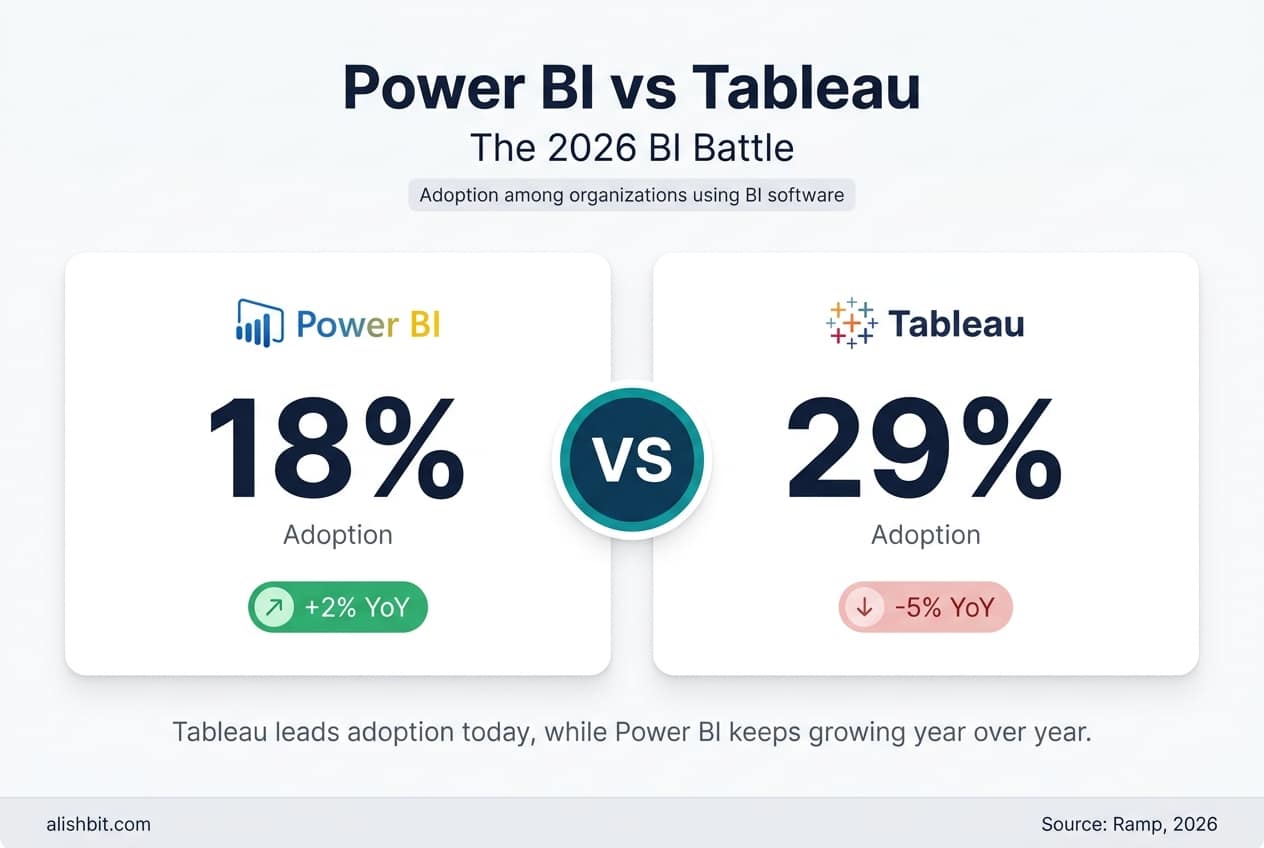
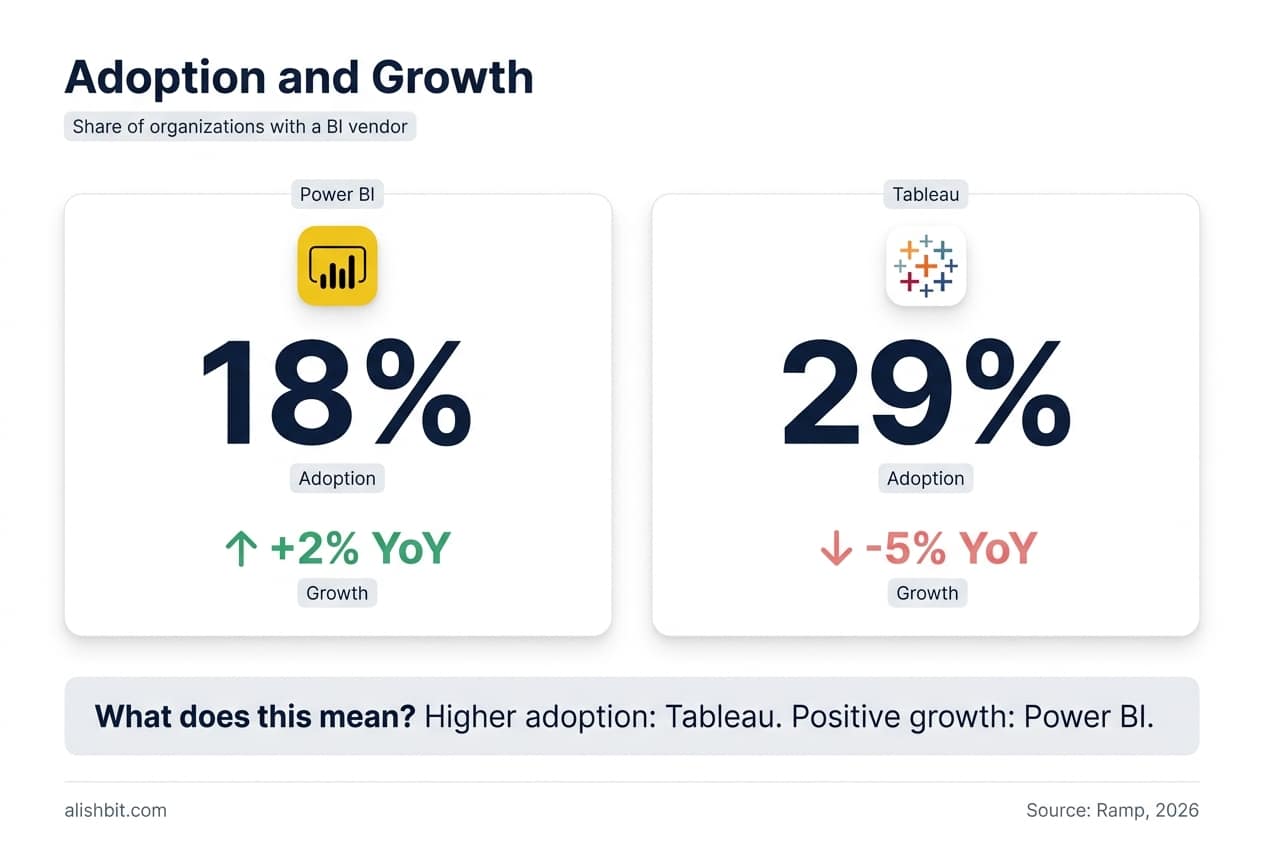
On analyst rankings, both platforms are recognized as Leaders in Gartner’s 2026 Magic Quadrant for Analytics and Business Intelligence Platforms, Microsoft’s nineteenth consecutive year in that position. For a rougher read on real-world adoption patterns, the chart below draws on Ramp’s own vendor-spend data, drawn from Ramp’s customer base rather than an independent market survey.
Power BI vs Tableau: AI features in 2026
This is where Power BI has pulled clearly ahead.
Power BI with Copilot can:
- Generate full reports from a natural language prompt against a Fabric Lakehouse
- Create DAX measures from descriptions (“calculate year-over-year revenue growth excluding refunds”)
- Summarize dashboard insights in plain English
- Answer questions in Microsoft Teams via the Power BI app
Tableau Pulse delivers:
- Automated metric monitoring with anomaly detection
- “Ask Data” natural language queries
- Einstein Discovery for predictive modeling (separate Salesforce product)
Both are useful. Copilot is more integrated and feels more capable for typical business users in 2026. Tableau’s AI story is improving but lags Microsoft’s investment pace.
Governance, security, and deployment
For enterprises, this often matters more than visualizations.
Power BI’s strengths:
- Sensitivity labels inherit from Microsoft Purview / Information Protection
- Workspace roles map cleanly to Azure AD groups
- Deployment pipelines for dev/test/prod promotion
- Row-level and object-level security native, no extra licenses
Tableau’s strengths:
- Project hierarchies with granular permissions
- Tableau Cloud is genuinely well-managed; less ops work than self-hosted
- Subscription and alert management is more polished out of the box
If you’re already using Microsoft Purview, Defender for Cloud Apps, or Entra ID Conditional Access, Power BI integrates natively. You’d duplicate effort to govern Tableau to the same standard.
Performance at Scale
For datasets under 10 GB, both tools perform fine on typical enterprise hardware. Above that:
- Power BI Premium with DirectQuery to Microsoft Fabric handles billions of rows. The architectural shift to Fabric in 2024-2025 changed Power BI’s enterprise story significantly.
- Tableau with Hyper engine has been a workhorse for years. It still performs well on extracts up to about 50 GB, and with live connections to columnar databases it scales effectively.
Neither tool is the bottleneck for most teams. Your data warehouse design matters far more than your BI front-end.
When Power BI wins
- You use Microsoft 365 or Dynamics 365
- Your data lives in Azure, Dataverse, or Fabric
- You want AI-assisted authoring (Copilot)
- You need embedded analytics in Microsoft-stack applications
- Cost matters – Power BI is meaningfully cheaper at almost every team size
- You need strict governance integrated with Microsoft security tooling

When Tableau wins
- Your team is Mac-heavy (Power BI Desktop is Windows-only; Power BI Service works in browser but authoring is harder)
- Your data lives in Salesforce and you want native CRM Analytics integration
- You need maximum visualization flexibility for external or executive dashboards
- Your analyst team is already trained on Tableau and switching cost is high
- You build public-facing data journalism or interactive data stories
Power BI vs Tableau migration considerations
If you’re currently on Tableau and considering Power BI, the typical migration takes 8-16 weeks for a mid-market organization:
- Discovery (2 weeks): Inventory dashboards, classify by usage, identify which to migrate vs retire
- Data layer rebuild (4-6 weeks): Recreate calculated fields and data models in Power BI semantic models
- Visual recreation (4-6 weeks): Rebuild dashboards (this is faster than people expect – most are simpler than they look)
- User training and cutover (2 weeks): Parallel running, then deprecation
The good news: about 70% of typical Tableau dashboards can be replicated in Power BI without losing functionality. The other 30% – the highly custom ones – usually need redesign rather than direct migration.

Our take as a Microsoft Partner
We’re transparent about our bias: we implement Microsoft Dynamics 365, Power Platform, and Power BI. That said, we’ve genuinely told prospects to stay on Tableau when:
- Their analyst team had 5+ years of Tableau muscle memory and the team was small enough that retraining would cost more than the license savings
- Their primary data source was Salesforce and they wanted CRM Analytics
- They had a sophisticated public-facing analytics product where Tableau’s customization justified the cost
For everyone else – and that’s the large majority of mid-market companies running on Microsoft 365 – Power BI is the better long-term bet in 2026. The cost difference compounds, the AI gap is widening, and the Fabric integration is now genuinely strategic, not a nice-to-have.
Power BI vs Tableau: frequently asked questions
Is Power BI really cheaper than Tableau?
Yes, for almost every team size. Power BI Pro is $14/user/month vs Tableau Creator at $75/user/month. Even when you add Power BI Premium Per User ($24/month) for advanced features, you’re typically paying 30-50% less than Tableau for equivalent functionality. The gap widens further if you have hundreds of read-only viewers – Power BI Premium capacity makes them effectively free, while Tableau still charges $15/viewer/month.
Can Power BI do everything Tableau can do?
Functionally, about 90% – and that 90% covers virtually all internal business dashboards. The remaining 10% is where Tableau’s visualization flexibility shines: highly custom interactive data stories, complex calculated fields, and pixel-perfect designer dashboards. For most mid-market business intelligence needs, Power BI is fully capable.
Which tool has better AI features in 2026?
Power BI Copilot is meaningfully ahead of Tableau Pulse for typical business users. Copilot can generate full reports from natural language, write DAX, and integrate into Microsoft Teams. Tableau Pulse is strong for automated metric monitoring and anomaly detection, but the breadth of Copilot’s capabilities reflects Microsoft’s larger AI investment.
Should I migrate from Tableau to Power BI?
Only if the cost savings, Microsoft ecosystem integration, or AI features create real value for your team. Don’t migrate just because Power BI is cheaper – the migration project itself costs $50K-$200K for mid-market organizations. The ROI is clear when you have 100+ users, your data is in Microsoft Azure or Dataverse, or you’re already paying for Microsoft 365 E5 licenses that include Power BI Pro at no additional cost.
Does Power BI work on Mac?
Power BI Desktop is Windows-only. The Power BI Service (browser-based) works fine on Mac, and you can author basic reports there, but advanced data modeling and DAX work require Windows. Mac-heavy teams often run Power BI Desktop via Parallels or use a Windows VM. If your authors are mostly on Mac, Tableau’s native Mac authoring is a real advantage.
Is Power BI included in Microsoft 365?
Power BI Pro is included with Microsoft 365 E5 licenses but not E3 or Business Premium. If you’re already paying for E5, Power BI Pro is effectively free. If you’re on E3 or Business Premium, you’ll pay $14/user/month on top.
How long does a Power BI implementation take?
For a typical mid-market company with one data warehouse and 5-10 dashboards: 6-10 weeks for the first deployment, including data modeling, dashboard development, security setup, and user training. Subsequent dashboards take days, not weeks, once the foundation is in place.
Ready to make a decision?
If you’d like an honest Power BI vs Tableau assessment for your specific data stack, team skill set, and governance requirements, book a 30-minute consultation or contact us for a no-obligation discovery call.
Maybe you’ve decided Power BI vs Tableau falls in Microsoft’s favor, or maybe you’re still weighing the choice. Either way, we can help. We’ve implemented Power BI for finance teams reporting on Dynamics 365 Business Central, sales teams running on Dynamics 365 Sales, and operations teams pulling from custom Azure SQL warehouses. We can also tell you when Power BI isn’t the right fit – and that honesty is why our clients keep coming back.
Learn more about our Power BI consulting services
Last updated: May 2026. Pricing and feature comparisons reflect publicly available information at the time of publication. Always verify current pricing on the Microsoft Power BI and Tableau websites.
Want Reports Your Team Actually Uses?
AlishBit builds Power BI reporting for businesses across Spain and Europe. Book a free consultation and see what your data could be telling you.